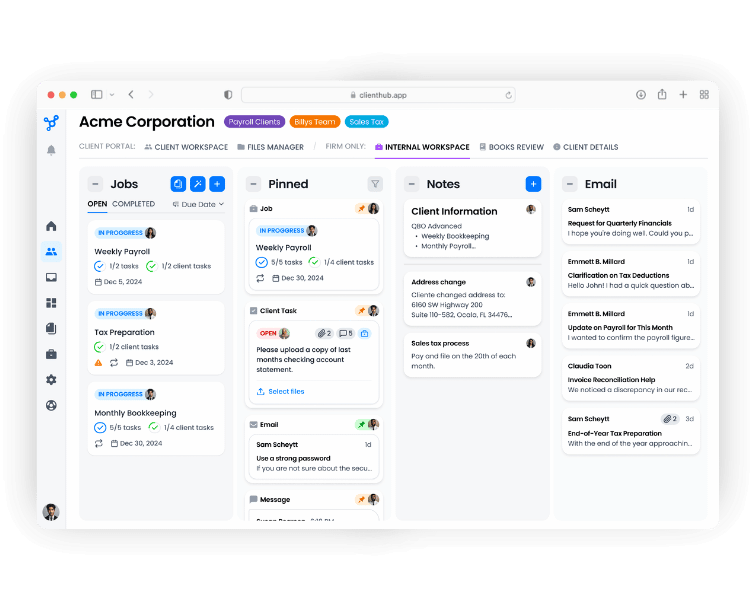
Mid-Sized Firms Hero

Practice Management Software for Accounting Firms That Scale

Standardize operations across your entire firm

Built for mid-size, CAS, and growth-stage firms. Standardize your workflows, gain real-time pipeline visibility, and deliver a consistent client experience, without adding headcount.

Get a Demo

Your Firm Is Growing. Your Tools Aren't Keeping Up

The growing pains that hit every accounting firm between 5 and 50 staff — and exactly what Client Hub solves.

Growth Breaks Your Workflows

When you add staff, things break. No two team members run an engagement the same way. Clients get inconsistent experiences and new hires take too long to ramp up.

No Visibility Without a Meeting

You don't know who's overloaded, what's at risk, or where a job stands — without interrupting your team to find out. There's no single view of capacity or pipeline.

Client Experience Slips as the Team Grows

The personal touch that helped your firm grow starts slipping. Requests fall through the cracks, response times slow, and clients feel like they're no longer a priority.

Every New Client Starts from Scratch

Onboarding is ad hoc. There's no standardized process. New clients get a different experience depending on who handles them and every engagement relies on one person's memory.

Built to Help Growing Firms Move Work Forward

When your team grows past five people, task lists stop working and real workflows begin

Most practice management systems stop at internal task management. Client Hub combines internal workflows, client collaboration, recurring accounting operations, and bookkeeping automation in one system
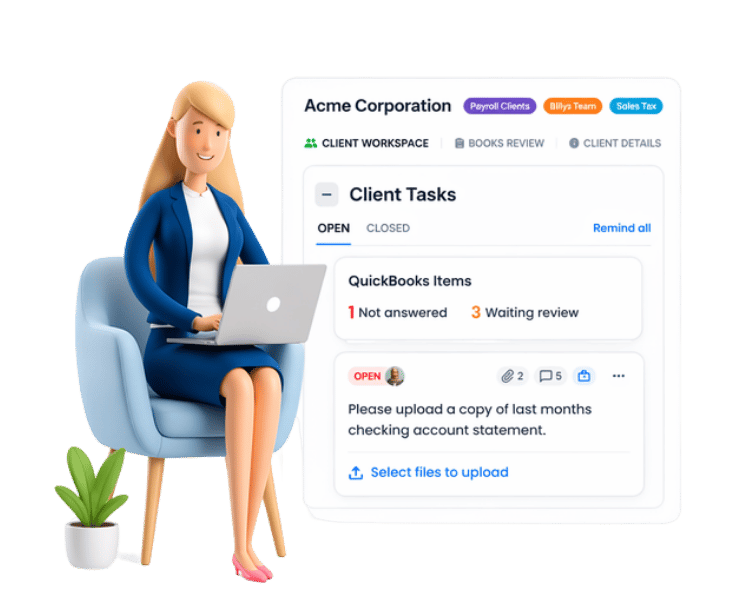
  • Built-in client portal for faster collaboration
  • Reusable workflows for recurring services
  • Real-time visibility into staff workload and project status

One Process. Every Team Member. Every Client.

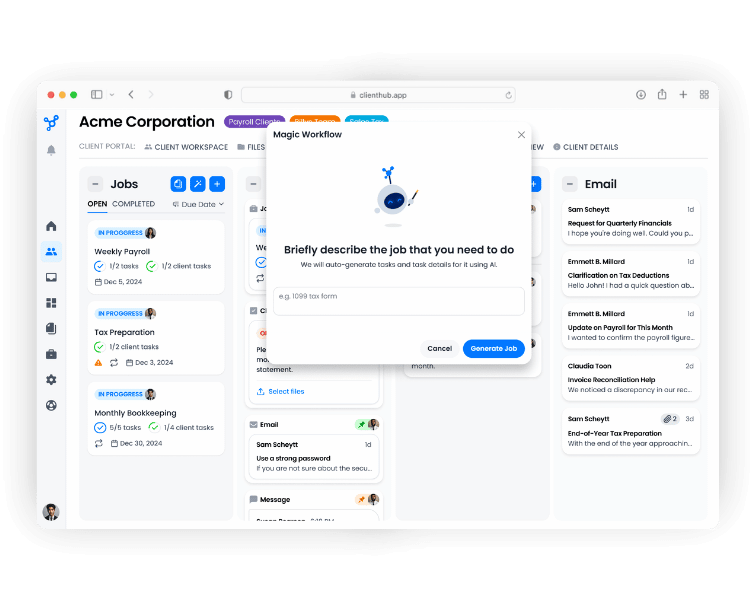
Magic Workflows build your firm's playbook so anyone can run an engagement the right way

Client Hub's AI-powered workflows ensure every client engagement follows the same structured process, regardless of who handles it. Build your firm's playbook once, and every new team member runs engagements correctly from day one.

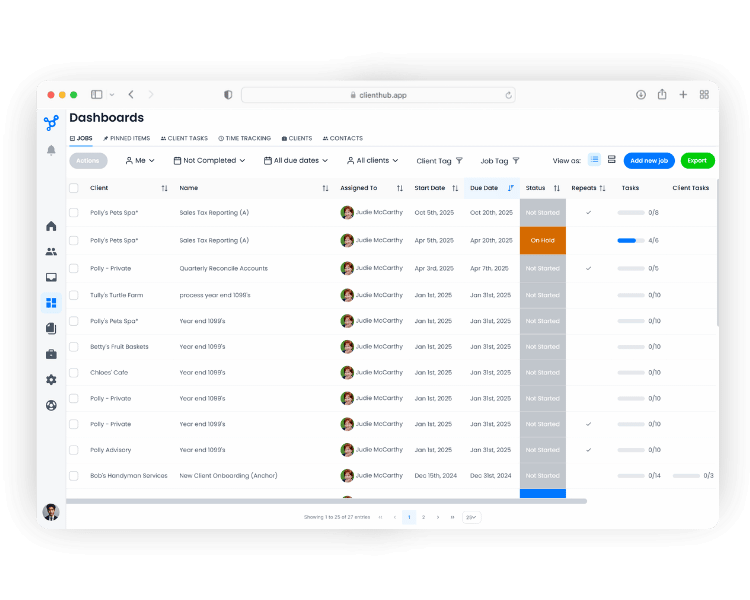
Know Exactly Where Every Job Stands Across Your Entire Firm.

Real-time pipeline visibility and automatic team handoffs, no status meeting required

The Jobs Dashboard gives firm owners and managers a real-time, calendar and list-based view of every job across the firm. Task Group Boxes trigger automatic handoffs: when a preparer finishes their tasks, the reviewer is notified instantly. No check-ins. No bottlenecks. No missed deadlines.
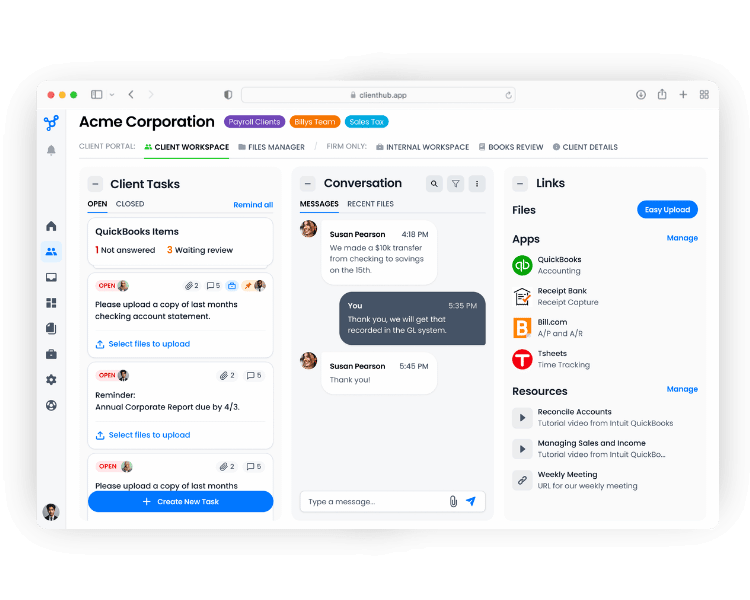
Deliver a Consistent Client Experience as You Grow.

Your branded portal keeps every client interaction structured, on record, and on time

Document requests, approvals, and messages flow through one structured channel the whole team can see, manage, and audit. No more client experiences that depend on who picks up the file.

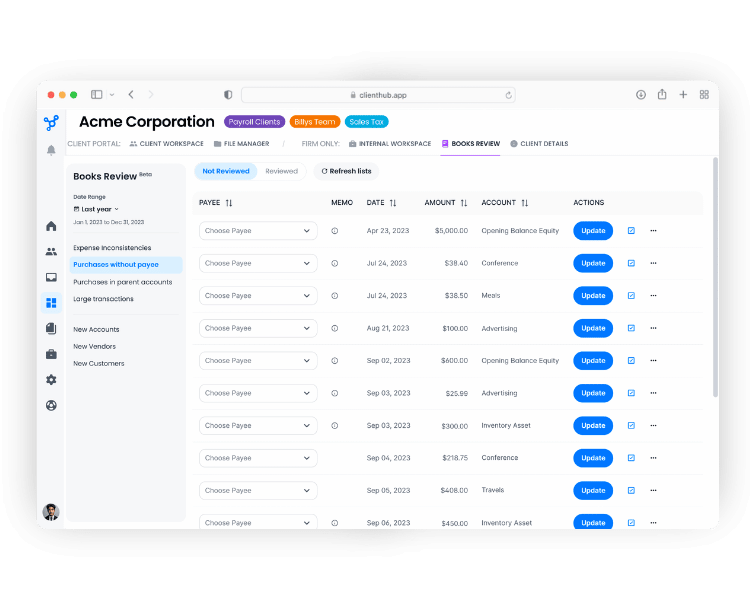
Run Recurring Client Accounting Services With Ease.

Eliminate month-end chaos and create an automated recurring system your whole team can run

Books Review automatically pulls uncategorized transactions from QBO and routes them directly to clients for resolution. No email threads, no manual cleanup. Resolved entries sync back to QBO in one click. Recurring workflow templates trigger automatically each month, so your team's entire monthly cycle runs on schedule without anyone having to start it.
Client Hub is the solution
CLIENT HUB MOBILE APP

Deliver unbeatable client service ​​from any device, anywhere.

Drive radical productivity with a collaborative workflow solution that prioritizes client experience.

Encourage client self-service, gather critical information and documents, and unclog your inbox with Client Hub’s mobile app for ​​small business accounting and bookkeeping firms.

Why Do Users Love Client Hub?

Firms save time, reduce effort, and drive growth with our solution. These are some of their stories.
“My clients love the collaboration it provides. My bookkeeper and I have full transparency of outstanding tasks and deadlines.”
Legacy Accounting
Capterra LogoQuickBooks Online LogoClient Hub Logo
“I love the fact that we can set up an automatic job template that has client tasks that's going to spit out every single month automatically, without me having to go and launch that every single month. It just takes work off my shoulders.”
Ricardo Ardiles
PharmaTax & Dental Tax
Capterra LogoQuickBooks Online LogoClient Hub Logo
“Client Hub has been a game changer for my business. It's the perfect solution for an efficient workflow between my team and for my clients. Moving client and team communication primarily out of email and into Client Hub has saved my lots of time and given me back my sanity. I can't wait to grow with Client Hub!”
Danielle Kleinrichert
Neatbooks, LLC
Capterra LogoQuickBooks Online LogoClient Hub Logo

Frequently Asked Questions

Can we see who on our team is overloaded before a deadline gets missed?

Yes. The Jobs Dashboard gives managers a real-time view of every team member's workload — filtered by person, client, or due date. You can spot bottlenecks and redistribute work before anything falls through the cracks.

How does Client Hub handle firms running multiple service lines for the same client?

Client Hub supports multiple job types per client — bookkeeping, tax, advisory, payroll — each with their own workflow, assignee, and timeline. Everything sits under one client record so your team always has the full picture.

Are we charged per client as our firm grows?

No. Client Hub uses flat-fee, per-user pricing. You can add unlimited clients without your subscription costs increasing — making it highly cost-effective for scaling practices. Firms with 10+ users also qualify for bundle discounts.

How does Client Hub support CAS teams and recurring monthly services?

Client Hub is built for recurring workflows. Books Review automatically flags uncategorized transactions from QBO and routes them to clients for resolution, with one-click sync back to the ledger. Recurring workflow templates trigger automatically each month, so your team's cycle runs without manual setup.

Can we move from our current practice management tool without rebuilding everything?

Most firms are up and running in under two weeks. Your existing workflows can be recreated using Magic Templates, and our US-based support team handles onboarding at no extra cost. No implementation fees, no downtime.

Will my clients need training?

No, the client portal is built for busy business owners, not software users. Clients upload documents, respond to requests, and sign off on approvals from their phone without any onboarding. Most clients engage with their first request within minutes of receiving it. 

What if different teams or service lines use different workflows?

Client Hub supports distinct workflow templates per service line, bookkeeping, tax, advisory, payroll, so each team runs their own process without interference. Templates are fully customizable, and team members only see the work assigned to them.

Ready to Build a Calm, Profitable Firm with Smarter Accounting Practice Management?

Who We Serve

Client Hub's workflow, practice management, and client communication tools are the right choice for many different kinds of firms.