Stay Connected with Integrations for Accounting Software

Client Hub integrates with your tech stack, including QuickBooks and Xero, to automate onboarding, streamline operations, and simplify month-end close and client reporting.

Get a Demo
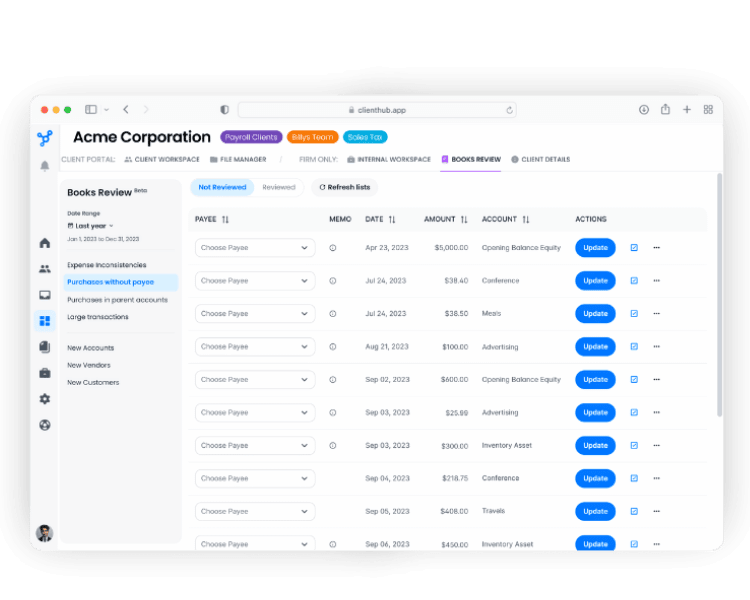
Client Hub accounting practice management dashboard

Goodbye, Fragmented Tools... Hello, Comprehensive Solution!

With Client Hub, your team always has full context without switching screens or exiting their workflow. They spend less time chasing clients and more on tasks that drive revenue and help your business grow.

Ledger Sync and Transaction Management with QuickBooks Online

Client Hub automates client inquiries and streamlines month-end close with deep QuickBooks Online integrations and two-way sync.

  • True 2-Way Sync: "Expense" and "Check" transactions pull directly into Client Hub. When clients add descriptions or upload receipts, the data pushes back to QBO instantly.
  • Books Review: An internal quality control center utilizes AI to  automatically flag duplicate payees, missing names, or large transactions before month-end close.
  • Direct Attachments: Clients upload receipts to requests, and you see them attached inside QBO immediately.

Transaction Sync and Financial Record Optimization with Xero

Client Hub integrates with Xero to keep invoices, payments, and client records aligned across workflows, helping your team stay on top of follow ups and simplify month-end close.

  • Auto-Fetch Inquiries: "Spend Money" transactions from mapped accounts are automatically pulled into the system and turned into client tasks.
  • Seamless Reconciliation: Review client answers in Client Hub with automatic two-way sync to keep transactions instantly updated for final coding.
  • Recategorizing Transactions: Unassigned entries feed into Client Hub automatically. Clients add context and upload receipts, then your staff member reviews, approves, and posts the updates to the books in one click.
  • Books Review (Data Resolve): The system brings data issues such as inconsistent expenses, purchases missing vendors, unusually large entries, and records without supporting documents to the surface for fast review.

Proposal-to-Project Automation

Turn signatures into immediate action. Every time a client accepts a proposal in Anchor, Client Hub drives efficiency by automatically setting up a workspace and workflows.
  • Instant Setup: The moment a proposal is approved in Anchor, Client Hub automatically creates the client workspace, sets up the file folder structure, and applies the necessary workflow templates.
  • Smart Job Creation: Services in the proposal are mapped to Job Templates, instantly generating the tasks necessary for your team to be able to get right to work.

Streamline Communication and Fast Track Approvals

Get more done faster within a fully integrated communication loop. Turn Outlook or Gmail emails into trackable jobs, use AI to draft instant responses, and secure document approvals with e-signatures via SignWell.

  • Actionable Emails: Instantly convert client emails into trackable jobs or tasks so nothing slips through the cracks.
  • Magic Reply: Use AI assistance to draft quick, context-aware client communication from within the platform.
  • Centralized Context: Never lose another email. Keep communication organized within the client workspace rather than buried in a personal inbox.
  • Native SignWell Integration: Fully embedded functionality allows for eSignature functionality with no additional costs.
  • Flexible Sending: Send requests directly via email or generate and embed a secure signature link inside a Client Task.
  • Status Tracking: Monitor document status (Sent, Viewed, Signed) in real time directly from the dashboard.

Client Hub Connects with Your Tech Stack

Over 5,000 Zapier integrations keep you plugged in and moving ahead.

  • Universal Import: Automatically import client lists from tools like Ignition, Google Sheets, or your CRM directly into Client Hub and keep them synced without manual processes.
  • No-Code Automation: Ensure your data remains consistent across your entire ecosystem with simple “Zaps” triggered by events in other apps.

Who We Serve

Client Hub's workflow, practice management, and client communication tools are the right choice for many different kinds of firms.

Why Do Users Love Client Hub?

Firms save time, reduce effort, and drive growth with our solution. These are some of their stories.
"Everything is in one place, saving time and frustration. Client Hub is an idea whose time has come!"
Jackie Beaulieu
Think Beyond the Desktop
Capterra LogoQuickBooks Online LogoClient Hub Logo
“Client Hub is a lifesaver for resolving unknown transaction details. Overall Client Hub has been a time saver—I get transaction details much faster.”
Luis R.
Capterra LogoQuickBooks Online LogoClient Hub Logo
“The automation of recurring monthly tasks and QBO integration has significantly cut labor hours and freed me up to focus on more important tasks.”
Stephanie
Capterra LogoQuickBooks Online LogoClient Hub Logo

Frequently Asked Questions

What software does Client Hub directly integrate with?

Client Hub offers deep native integrations with industry-standard tools including QuickBooks Online and Xero for accounting, Anchor for proposal automation, and Gmail and Microsoft Outlook for communication. Additionally, the platform connects with Zapier, allowing you to link your workspace to over 5,000 other applications.

Will my clients need access to my QuickBooks or Xero files?

No. One of the main benefits of Client Hub is security and simplicity. Clients log into their Client Hub portal only to answer questions or upload documents. They never need direct access to your accounting ledger, so your internal data remains secure while they stay focused on a simple task list.

How does the email integration help manage my inbox?

The email integration turns your personal inbox into a team workflow tool. By connecting Gmail or Outlook, you can instantly convert client emails into trackable Jobs or Tasks visible to your team.

Can I connect apps that don't have a direct integration?

Yes. Zapier integrations seamlessly connect Client Hub to virtually any other tool in your stack, including Google Sheets, CRMs, and marketing platforms.

How do Client Hub’s accounting integrations speed up my month-end close?

You can finally stop chasing clients for information. Instead of sending spreadsheets or emails, Client Hub’s integrations automatically pull uncategorized transactions from QuickBooks Online or Xero into the client’s portal. Clients can answer questions or upload receipts directly in Client Hub, and for QuickBooks users, that data syncs back automatically, significantly reducing data entry time.

Ready to Build a Calm, Profitable Firm with Smarter Accounting Practice Management?