Powerful, yet simple to use
Powerful firm workflows. Simple for your team and clients.
Client Hub gives accounting firms the practice management, client collaboration, accounting workflows, and AI they need in one simpler platform.
Get deeply connected QuickBooks and Xero workflows, free onboarding, and straightforward pricing—without taking on more software than your firm needs.

You can use a comparison chart and see what various products offer today. We'll win on some and maybe have some gaps, but all this can become outdated quickly.
For your firm's practice management system, consider a multi-year horizon.
Look at what won’t change. Three commitments have always defined us. If they resonate with you, we’re the right partner for your firm.
Powerful firm workflows. Simple for your team and clients.
Get US-based support from people who know firm work firsthand. Most of our customer success team worked in firms before joining Client Hub.
Straightforward per-user pricing lets your firm support unlimited clients, without per-client fees or setup costs.
See if Client Hub is the right fit for your firm.
Book a personal demo.Karbon is a powerful, highly configurable practice management platform. For larger firms with complex operational requirements, that depth can be valuable.
Client Hub takes a different approach: give small and midsize accounting firms powerful practice management while keeping implementation and everyday use simple.
The question isn't whether Karbon is powerful. It is whether your firm needs all that power and complexity.
Karbon is candid about the tradeoff that comes with a robust platform.
“Functionality is geared towards teams, so may not be suitable for sole practitioners or teams of two to three staff that don’t anticipate growing”
— Karbon
Read this on Karbon's website →
On the same page, Karbon says its product is built for accounting, tax, and bookkeeping firms with teams of five or more.
Karbon also lists another limitation of its own platform:
It may require more time to set up than basic alternatives.
That can be a reasonable tradeoff for a firm that needs Karbon's depth.
But if your firm wants powerful practice management without taking on unnecessary complexity, there is another option.
That's where Client Hub fits.
Your practice management system shouldn't stop where the accounting work begins.
Client Hub connects your team directly to the QuickBooks and Xero work they need to complete.
Resolve uncategorized transactions. Manage month-end close. Review financial reports. Handle 1099 workflows. Keep client questions connected to the accounting work that prompted them.
Instead of managing the work in one system and doing the work in another, Client Hub brings them together.
Practice management that actually reaches into the books.

Karbon's configurability is one of its strengths.
It's also one of the reasons Karbon acknowledges that implementation can take longer than simpler alternatives.
Client Hub is designed around the workflows accounting firms use every day, so you don't need to build an elaborate system before your team can benefit from it.
Manage recurring work. Track deadlines. Collaborate with your team. Request information from clients. Manage documents. Track time. Use automation and AI.
Without turning practice management into a project of its own.
Less to configure. Easy to learn. Simple for staff and client adoption.
Lots of software can summarize text or help draft an email.
Client Hub AI goes deeper into the accounting work itself.
For example, Client Hub can use AI to review a client's Balance Sheet and Income Statement directly from QuickBooks Online or Xero, analyze the financial information, and highlight areas that may warrant further review by your team.
That gives accountants an AI-assisted first pass at the financials—not just another generic writing assistant.
Client Hub brings that intelligence into the same system where your team manages the client, the work, the review process, and the follow-up.
AI that understands the accounting work you're actually doing.

Karbon currently offers:
Team
$59/user/month when paid annually
Business
$89/user/month when paid annually
Enterprise
Custom pricing
Karbon identifies Business as its most popular plan. Features including automatic client reminders, task automation, and industry integrations are included at that level.
Client Hub offers:
Practice Manager
$59/user/month when paid annually
Practice Manager + QuickBooks & Xero integrations
$79/user/month when paid annually
All Client Hub plans include unlimited clients, unlimited storage, AI features, support, and training.
Get the capabilities your firm needs without paying for complexity it doesn't.
Changing practice management systems is already a big enough decision.
Client Hub onboarding is included at no additional cost.
We help you get set up and get your team using Client Hub without charging you separately for onboarding or training.
With Client Hub:
Free onboarding.
Training included.
A simpler path to getting your firm up and running.
Karbon offers a much broader professional-services ecosystem for firms that want additional implementation, migration, consulting, and training support.
For example, Karbon currently publishes:
| Example Karbon service | Published price |
|---|---|
| Team training for up to 12 people | $499 |
| White Glove Experience | Starting at $9,999 |
Karbon's White Glove Experience includes a customized implementation plan, process migration, configuration, and custom training.
That level of support can make sense for a firm that needs a highly customized implementation.
But many accounting firms would rather not need a major implementation project in the first place.
Per-user prices don't always make the difference obvious.
Here's what the annual subscription cost looks like for Client Hub's Practice Manager plan at $59/user/month compared with Karbon Business at $89/user/month, Karbon's most popular plan.
| Team size | Client Hub Practice Manager | Karbon Business | Annual savings |
|---|---|---|---|
| 2 users | $1,416 | $2,136 | $720 |
| 5 users | $3,540 | $5,340 | $1,800 |
| 10 users | $7,080 | $10,680 | $3,600 |
| 20 users | $14,160 | $21,360 | $7,200 |
These figures compare subscription prices only. Client Hub Practice Manager excludes QuickBooks and Xero integrations. Karbon also offers optional paid implementation, migration, consulting, and training services.
Pay for the capabilities your firm needs—not complexity it doesn't.
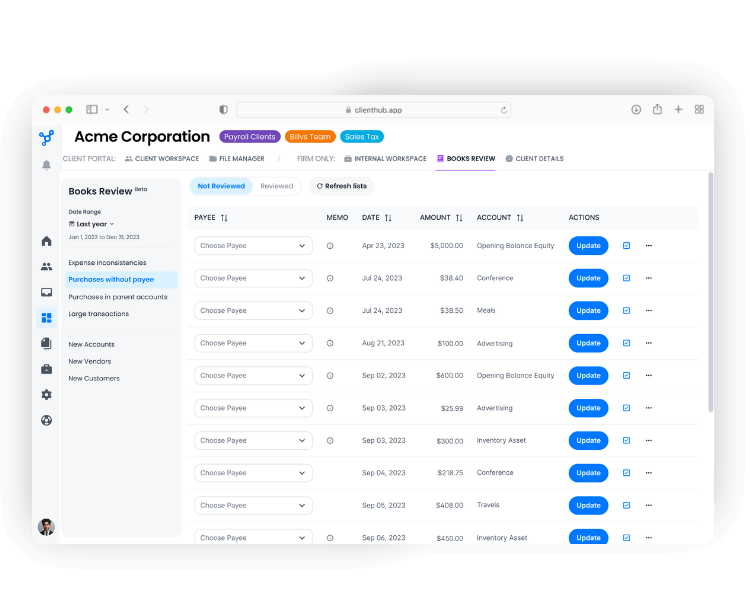
Uncategorized transactions often create one of the most frustrating workflows in bookkeeping: identify the transaction, figure out what you need from the client, contact them, wait for a response, track the answer, and then return to the books to finish the work.
Client Hub brings that entire flow together.
Identify uncategorized transactions from QuickBooks or Xero, send the questions to the client, let the client provide the information your team needs, and keep the response connected to the transaction and the accounting workflow.
From transaction to client question to resolution—in one connected workflow.
Track the accounting work required for each client alongside the tasks, team members, deadlines, and client dependencies needed to complete it.
Give your team visibility into what's done, what's missing, and what needs attention next.
Once the books are ready for review, Client Hub can analyze Balance Sheets and Income Statements directly from QuickBooks Online or Xero.
AI highlights potential areas for further investigation, helping your team focus its attention where professional review may be most valuable.
The accountant stays in control—the AI helps make the review process faster and more focused.
| Decision factor | Client Hub | Karbon |
|---|---|---|
| Best fit | Small and midsize accounting firms that want powerful practice management without unnecessary complexity | Firms that need a robust, highly configurable practice management platform |
| Implementation | Designed for a straightforward rollout with free onboarding | Robust platform with multiple implementation and consulting options |
| QuickBooks & Xero workflows | Deep workflows for performing accounting work, including uncategorized transactions, close and financial review | Accounting-platform integrations within a broader practice-management ecosystem |
| AI | Accounting-focused AI, including analysis of QBO/Xero financial statements to identify areas for further review | AI capabilities across Karbon's broader practice-management platform |
| Client collaboration | Client portal, mobile app, tasks, messaging, files and eSignature | Client portal and iOS/Android apps with modern client collaboration |
| Complexity | Less to configure, easy to learn, simple for staff and client adoption | Highly configurable with greater setup requirements |
| Annual pricing | $59/user; $79/user with QBO/Xero integrations | $59 Team; $89 Business; Enterprise custom |
| Onboarding | Included at no additional cost | Implementation support plus optional paid professional services |
Both are capable practice management platforms.
The difference is how much software your firm actually needs—and how closely that software connects to the accounting work you're doing every day.
One of the biggest reasons firms stay with a practice management system isn't because they love it.
It's because switching sounds difficult.
We make the transition easier.
Client Hub onboarding is free, and our team works with you to get your firm set up and ready to use Client Hub.
Whether you're replacing Karbon because of complexity, cost, or because you want deeper accounting workflows, we'll help your team get started.
You shouldn't need a complicated implementation to get value from your practice management software.
And your clients shouldn't need extensive training to use it.

“Client Hub was so easy to set up, it took less than 10 minutes. The first client I showed it to loved it. It’s exactly what she has been asking for.”
“The clarity and simplicity it offers are truly invaluable in mediating the chaos of daily business operations. It provides a sense of calm and efficiency, freeing up significant time that can now be dedicated to assisting my clients.”
Less complexity for your staff. More time for your clients.
Yes. Client Hub combines practice management, workflow, client collaboration, accounting integrations, and AI in a single platform.
It is particularly well suited to small and midsize accounting firms that want powerful practice management without the implementation complexity of a more highly configurable system.
Yes. Karbon is a powerful and well-established practice management platform, particularly for firms that value extensive configuration, collaboration, and sophisticated practice-management capabilities.
The question for smaller firms is whether they need that additional complexity.
Karbon itself says its functionality is geared toward teams and may not suit sole practitioners or teams of two to three who don't anticipate growing.
Client Hub is designed to get accounting firms up and running without a large implementation project, and onboarding is included at no additional cost.
Karbon acknowledges that its robust platform can take more time to set up than simpler alternatives and offers an extensive range of implementation, migration, training, and consulting services.
Karbon provides implementation support and also offers optional paid professional services.
For example, Karbon publishes team training for up to 12 people at $499 and a White Glove Experience starting at $9,999.
Not every Karbon customer will purchase these services, so the actual cost depends on the level of support a firm chooses.
Karbon's published annual pricing is currently $59 per user per month for Team and $89 per user per month for Business. Enterprise pricing is customized.
Karbon identifies Business as its most popular plan.
Client Hub Practice Manager is $59 per firm user per month with annual billing.
Practice Manager with QuickBooks and Xero integrations is $79 per firm user per month with annual billing.
A Solopreneur plan is also available for single-user firms.
Yes. Karbon has invested significantly in its client experience and currently offers a client portal as well as iOS and Android apps.
Client Hub also provides a modern client portal and mobile app.
For most firms evaluating the two products, the more meaningful differences are practice-management complexity, implementation, accounting workflows, AI, and cost.
Yes.
Client Hub is designed to operate as your firm's practice management platform—not as an add-on to Karbon.
Manage your firm's work, deadlines, team collaboration, clients, documents, client requests, accounting workflows, and more from Client Hub.
Karbon is a powerful platform.
But if your accounting firm wants powerful practice management without unnecessary complexity, Client Hub may be the better fit.
Get deeper accounting workflows. Get AI built around accounting. Get free onboarding. And give your staff and clients a system that's easier to adopt.

.svg)


.svg)
