Powerful, yet simple to use
Powerful firm workflows. Simple for your team and clients.

Practice management, client collaboration, QuickBooks and Xero workflows, and an amazing mobile app
—with free onboarding and no per-client fees.
Get deeply connected QuickBooks and Xero workflows, free onboarding, straightforward pricing, and a client experience your firm can be proud to offer.
Financial Cents is a capable practice management platform built for accounting firms.
Client Hub takes a more client-centered approach, connecting practice management to the accounting work itself while keeping the experience simple for staff and clients.
Financial Cents publishes pricing for its Month-End Close add-on:
“Month-End Close (MEC) — $5 / month per client billed annually”
See Financial Cents' current pricing →
The tradeoff is that the cost grows with every client you bring on.
Client Hub's QuickBooks and Xero integration plan is included in the subscription, with unlimited clients.
Financial Cents' pricing page states:
“Minimum 5 users required for monthly billing”
Its Solo plan is offered on annual billing only.
For a firm with one to four people, that means there is no month-to-month option. You either commit to a year up front, or you buy five seats you do not need.
Client Hub has no user minimum on monthly billing. Practice Manager is available month-to-month at any team size, including a single user.
Your practice management system should connect directly to the accounting work your team needs to complete.
With Client Hub's QuickBooks and Xero integration plan, your team can resolve uncategorized transactions, manage month-end close, review financial reports, and keep client questions connected to the accounting work that prompted them.
The plan is priced by firm users and includes unlimited clients, so adding another month-end-close client does not add another per-client software charge.
Practice management that reaches into the books.

Client collaboration only works when clients actually use it.
Client Hub gives clients a clean portal and mobile app for messages, tasks, files, eSignatures, and accounting questions.
The experience is designed to feel familiar and easy from the first interaction, so your team spends less time explaining where to click and more time moving work forward.
Simple for your team. Easy for your clients.

Financial Cents documents useful AI tools for renaming files, drafting client emails, and generating workflow checklists.
Client Hub adds AI that goes deeper into the accounting work itself.
Client Hub can review a client's Balance Sheet and Income Statement directly from QuickBooks Online or Xero, analyze the financial information, and highlight areas that may warrant further review by your team.
That gives accountants an AI-assisted first pass at the financials inside the same system where they manage the client, the work, and the follow-up.
See Financial Cents' published AI capabilities →
AI that helps your team review the accounting work.

Financial Cents currently publishes:
Solo
$19/month, billed annually
Team
$49/user/month, billed annually
Scale
$69/user/month, billed annually
Month-End Close add-on
$5/month per client, billed annually
Client Hub offers:
Practice Manager
$59/user/month when paid annually
Practice Manager + QuickBooks & Xero integrations
$79/user/month when paid annually
All Client Hub plans include unlimited clients, unlimited storage, AI features, support, and training.
Choose the plan that matches your workflows, then grow your client list without another per-client software charge.
Changing practice management systems is already a big enough decision.
Client Hub onboarding is included at no additional cost.
We help you get set up and get your team using Client Hub without charging separately for onboarding or training.
With Client Hub:
Free onboarding.
Training included.
A clear path to getting your firm up and running.
Financial Cents includes unlimited support with its paid plans and offers a 14-day free trial.
Its current pricing page lists:
Team
$49/user/month, billed annually
Scale
$69/user/month, billed annually
Enterprise
Custom pricing with premium training and onboarding
Firms should confirm the rollout support included with the plan they are considering.
Per-user prices do not always show the total cost of accounting workflows.
This illustration compares Client Hub's Practice Manager + QuickBooks & Xero integrations plan at $79/user/month with Financial Cents Scale at $69/user/month plus $5/month for each accounting client using its per-client accounting workflow.
Illustrative client counts assume 10 accounting clients per firm user. All figures use annual billing. Financial Cents accounting-client fees are calculated at $5 per client per month.
As the number of accounting clients grows, Client Hub's unlimited-client pricing creates greater annual savings.
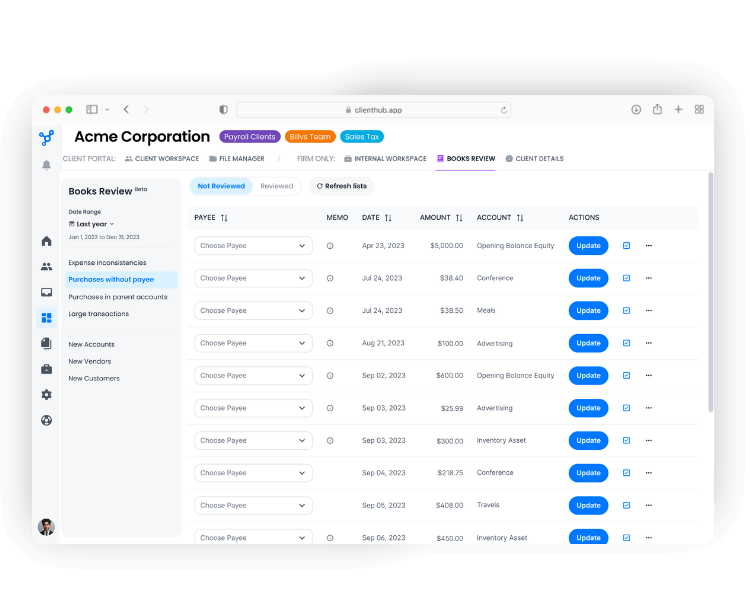
Uncategorized transactions often create a frustrating bookkeeping loop: identify the transaction, contact the client, wait for a response, track the answer, and return to the books.
Client Hub brings that flow together.
Identify uncategorized transactions from QuickBooks or Xero, send questions to the client, let the client provide the information your team needs, and keep each response connected to the transaction and the accounting workflow.
These workflows are included in Client Hub's integrations plan with unlimited clients, rather than priced as a separate add-on for each client.
From transaction to client question to resolution—in one connected workflow.
Track the accounting work required for each client alongside the tasks, team members, deadlines, and client dependencies needed to complete it.
Give your team visibility into what is done, what is missing, and what needs attention next.
Once the books are ready for review, Client Hub can analyze Balance Sheets and Income Statements directly from QuickBooks Online or Xero.
AI highlights potential areas for further investigation, helping your team focus its attention where professional review may be most valuable.
The accountant stays in control while AI helps make the review faster and more focused.
Both are capable practice management platforms.
The better fit depends on your accounting stack, client experience priorities, and how pricing changes as your client list grows.
One of the biggest reasons firms stay with a practice management system is that switching sounds difficult.
We make the transition easier.
Client Hub onboarding is free, and our team works with you to get your firm set up and ready to use Client Hub.
Whether you are replacing Financial Cents because you want a different client experience, Xero support, deeper accounting workflows, or a pricing model without per-client month-end-close fees, we will help your team get started.
Your team should be able to get value from its practice management system quickly.
Your clients should be able to use it without extensive training.
“After my clients were not adopting Financial Cents, I switched them to Client Hub, and it was night and day.”
“Client Hub was so easy to set up, it took less than 10 minutes. The first client I showed it to loved it. It’s exactly what she has been asking for.”
Less friction for your team. A simpler experience for your clients.
Yes. Client Hub combines practice management, workflow, client collaboration, QuickBooks and Xero integrations, and AI in a single platform.
It is especially well suited to accounting firms that want the client experience and accounting work connected to the same workflow.
Yes. Financial Cents is built for accounting firms and offers workflow, client collaboration, time tracking, billing, reporting, and automation.
The right choice depends on your accounting stack, client experience, AI needs, and how the total cost changes with optional add-ons.
Financial Cents currently lists Solo at $19/month, Team at $49/user/month, and Scale at $69/user/month with annual billing. Its Month-End Close add-on is $5/month per client, billed annually.
Client Hub Practice Manager is $59/user/month, while Practice Manager with QuickBooks and Xero integrations is $79/user/month, both with annual billing and unlimited clients.
Yes. Financial Cents currently lists Month-End Close as a $5/month per-client add-on billed annually.
Because pricing can change, confirm the current rate and included features on Financial Cents' pricing page.
Only for firms with five or more users. Its pricing page states "Minimum 5 users required for monthly billing," and the Solo plan is offered on annual billing only. Firms under five users commit annually.
Client Hub offers monthly billing on Practice Manager and Practice Manager PLUS with no minimum number of users. Pricing can change, so confirm current terms on each site.
Financial Cents documents AI for renaming client files, drafting client emails, and creating workflow checklists.
Client Hub also uses AI within practice management and can analyze Balance Sheets and Income Statements from QuickBooks Online or Xero to highlight areas that may need further review.
Client Hub supports connected QuickBooks Online and Xero workflows on its integrations plan.
Financial Cents lists QuickBooks Online integration in its current plans and uses that connection for its Month-End Close capabilities.
Yes. Client Hub is designed to operate as your firm's practice management platform.
Manage work, deadlines, team collaboration, clients, documents, client requests, accounting workflows, and more from Client Hub.
Compare the full plan and add-ons you will use, the accounting platforms you need to connect, the client experience you want to provide, and the work you expect AI to help complete.
A short product walkthrough with your real workflows is usually the clearest way to judge fit.
Client Hub brings your team, your clients, and the accounting work together in one calm, connected workspace.

.svg)


.svg)
