


The Mobile App for Accounting Firms That Keeps Client Work Moving

Run your practice from your pocket. With the Client Hub app, your team and your clients can message, share documents, and complete tasks from any phone.

Get a Demo
client portal software for accountants

Work Doesn't Stop When You Leave Your Desk,
Your Firm Shouldn't Either

Most practice management tools live on a desktop, so the moment anyone steps away, client work stalls.  The hold-up was never the work itself. It's the waiting.

Waiting on the client.

The document you asked for days ago still hasn't arrived.

Waiting on your desk.

A one-minute answer sits unsent until you're back at your laptop.

Waiting on the inbox.

Whatever came in overnight waits for the 9 a.m. inbox check.

One App. Your Whole Firm and Every Client

Most practice management apps are built for one side of the relationship, Client Hub’s mobile app for account firms was built for both.
● FOR YOUR TEAM
Answer client questions, review what came in, and keep jobs moving between meetings, between clients, or between flights. Real-time push notifications mean you see new activity the moment it happens, not at the next inbox sweep. Same login as the browser, nothing new to learn.
Real-time push notifications
Same login as the browser
Review & complete tasks anywhere
● FOR YOUR CLIENTS
Your clients already run their lives from their phones. Now they run their work with you the same way: responding to requests, uploading documents, and replying in seconds. The experience is simple enough that they actually use it, which is the whole point. When clients respond the first time, your work stops waiting.
Respond & upload in seconds
Simple enough they actually use it
No desktop, no friction

Effortless Client Tasks

Get the documents you need without the chase

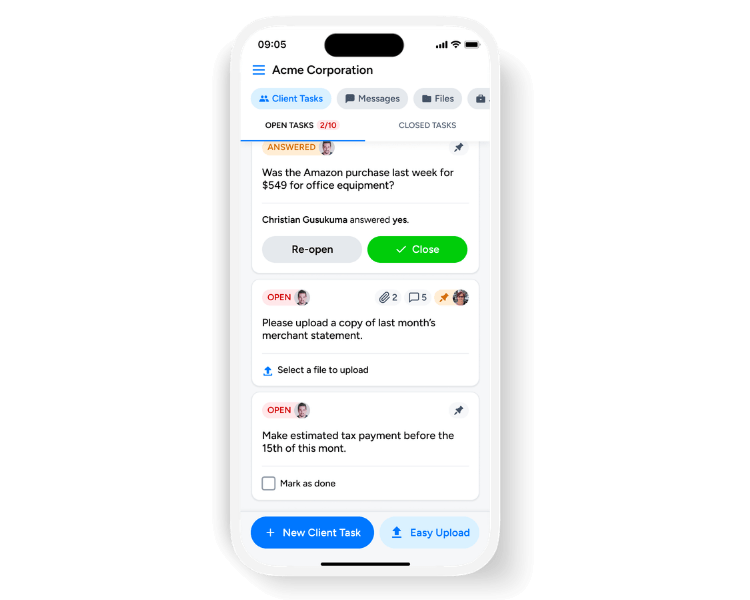
Every request you send shows up as a clear, tappable task on your client's phone, with status and due date right on the card. They tap, upload what's needed, and respond on the spot. Your team can create, preview, complete, and check tasks off from mobile too. No login hunt, no email scavenger hunt, no 'which form was that again?'

Streamlined Client Communication

Faster replies without the security risk of texting

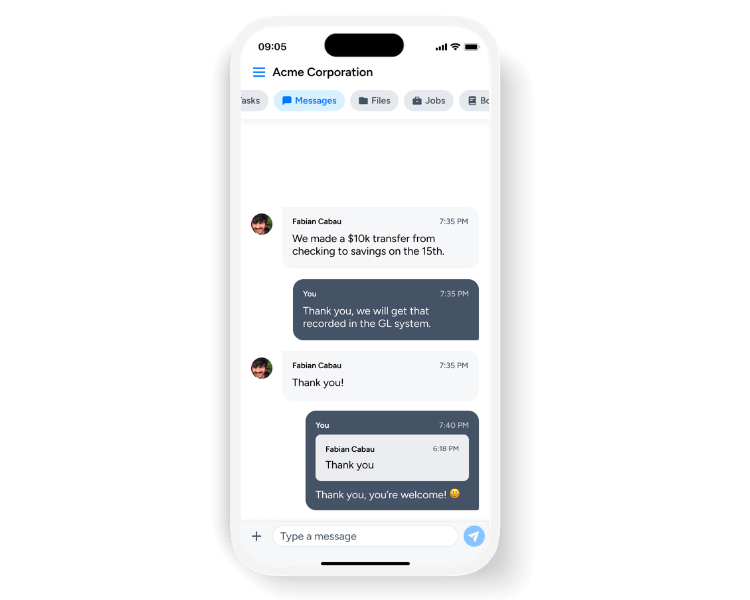
Give clients the speed of a text inside a secure, encrypted thread that keeps every conversation in one place. Send messages, attach files, react, and long-press to reply, then swipe to see exactly when something was read. Every message stays attached to the client and the work, so context never gets lost in someone's personal inbox.

On-the-Go Document Management

Collect and organize every document without the shoebox

Clients can snap a photo and upload a document the second it's in their hands: a receipt at the register, a statement at the kitchen table. Everything lands in organized folders and buckets so files route themselves. Browse, view, download, or print recent documents from your phone, and find what you need without digging.

Smart Notifications

Respond the moment it matters not the next inbox check

Push notifications alert your team and your clients the instant there's new activity: a message, a completed task, a fresh upload. And because Client Hub only notifies you about what you haven't already seen, you stay informed without the noise. Want fewer emails and faster updates? The app delivers them in real time, instead of waiting on the every-15-minutes email digest.

Why the Client Hub App

Built for Both Sides

Not a firm-only admin app. The client experience is a first-class citizen, because client response speed is what actually moves work forward.

iOS & Android, Same Login

Download from the App Store or Google Play and sign in with the same credentials you use in the browser. Nothing new for your team or your clients to learn.

Secure by Default

Client data is encrypted in transit and at rest on enterprise-grade infrastructure: the security financial data demands, with the ease of a messaging app.

Who We Serve

Client Hub's workflow, practice management, and client communication tools are the right choice for many different kinds of firms.

Why Do Users Love Client Hub?

Firms save time, reduce effort, and drive growth with our solution. These are some of their stories.
"I cannot say enough about how this app has helped us to work more efficiently because of its powerful communication tools."
Ibi Ojo
Capterra LogoQuickBooks Online LogoClient Hub Logo
"Our clients love the mobile app of Client Hub. Using modern ways to collaborate creates a better experience for our clients and sets us apart from other firms"
Nikole Mackenzie
Momentum Accounting
Capterra LogoQuickBooks Online LogoClient Hub Logo
“This app has streamlined client communications and workflow management. It really has everything in one place for what you'll need to run a practice. I love the mobile app and the QBO integration is Amazing. Really helped me be more efficient. The helpdesk/ IT team is awesome as well.”
Arielle A. Smith
Capterra LogoQuickBooks Online LogoClient Hub Logo

Frequently Asked Questions

Is the Client Hub mobile app free?

Yes. Our mobile app for accounting firms is included in your Client Hub subscription at no extra cost, for your whole team and all of your clients.

Is it available for iPhone and Android?

Yes. Download the Client Hub app from the Apple App Store or Google Play and sign in with your existing credentials.

What can my team do from the app versus the desktop?

Message clients, review and complete tasks, manage files, and get real-time notifications. Heavier setup, like building workflows and running Books Review, lives on the desktop app.

Can clients upload receipts and documents from their phone?

Yes. Clients snap a photo or upload a file directly, and it routes into the right folder automatically, with no more emailing attachments back and forth.

Can I access all of my older files on the app?

The app features a "Recent Files" tab that conveniently displays your 20 most recent documents. To access older files beyond those 20, you will need to log in to the web version of Client Hub.

How do I know if my client has seen my message?

You can check read receipts to see exactly who has viewed your message and when. Just swipe your sent message to the left, and a screen will pop up with the "Seen by" or "Viewed by" details.

Ready to Build a Calm, Profitable Firm with Smarter Accounting Practice Management?